Schedule Zoom Meetings & Create Posters
Learn how to schedule virtual meetings, automatically generate promotional posters, and invite your members with just a few clicks.
Running a modern union often means coordinating members across different locations, shifts, and schedules. Whether your local spans multiple job sites, cities, or even provinces, getting everyone in the same room isn't always possible. UnionTab's Online Meetings feature lets you schedule video meetings, generate branded posters, and send invitations to members — all from one place.
Important: In UnionTab, Meetings and Events are separate features. Events are for general calendar items — in-person gatherings, socials, community activities, and the like. Meetings are specifically for online video conferences with Zoom, Google Meet, or custom meeting links. This tutorial covers the Meetings feature.
Step 1: Navigate to Online Meetings
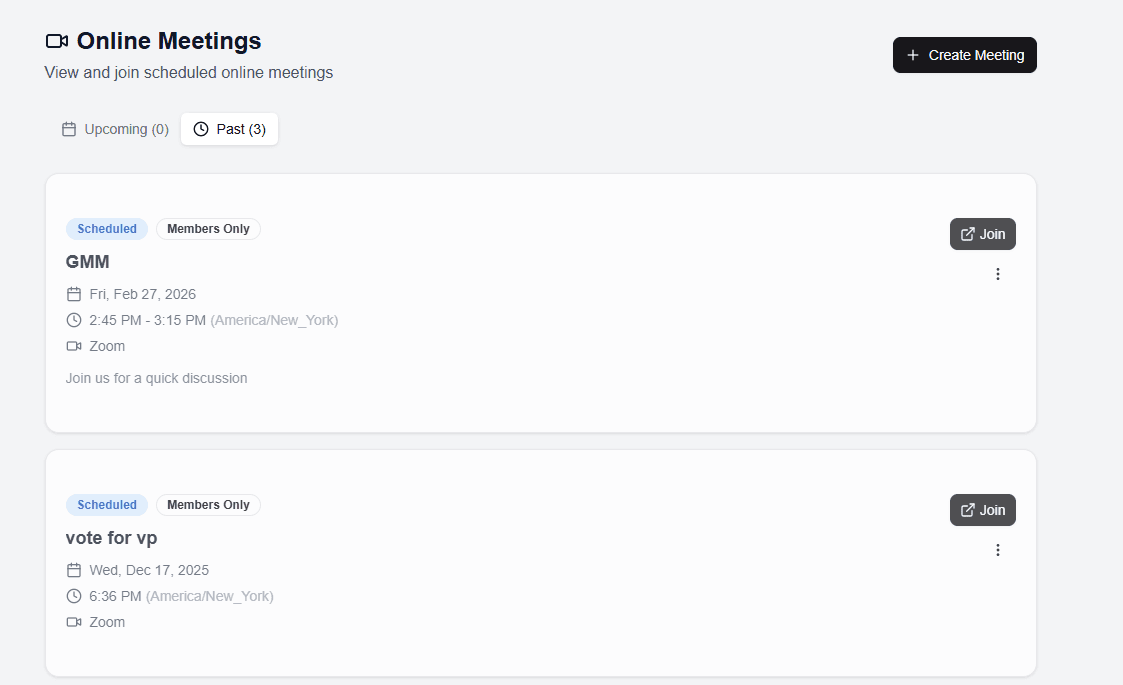
From the top navigation bar, click the Tools button (the shield icon) to open the mega-menu. Under the Member Tools group, click Meetings (the video icon).
You'll land on the Online Meetings page, which displays a Video icon and the subtitle "View and join scheduled online meetings."
The page is organised into tabs:
- Upcoming — meetings that haven't happened yet
- Past — meetings that have already taken place
- Cancelled — meetings that were cancelled (this tab is visible to admins only)

Step 2: Schedule a New Meeting
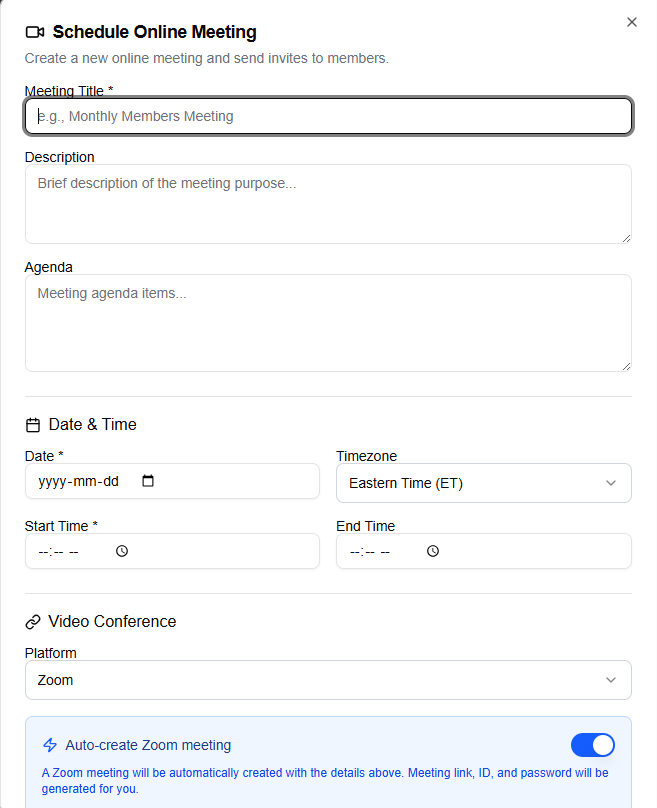
Click the Create Meeting button (available to admins and owners only). The dialog title reads "Schedule Online Meeting" with the description "Create a new online meeting and send invites to members."
Fill in the following fields:
- Meeting Title (required) — give your meeting a clear, descriptive name. For example: "Contract Ratification Discussion" or "Monthly Stewards' Meeting."
- Description (optional) — add context about the purpose of the meeting.
- Agenda (optional) — outline the topics to be covered. This will appear on the meeting poster, so members know what to expect.
- Date (required) — select the meeting date.
- Timezone — choose from Eastern, Central, Mountain, Pacific, Alaska, Hawaii, or UTC. This is especially important for locals with members in multiple time zones.
- Start Time (required) and End Time (optional) — set when the meeting begins and, optionally, when it's expected to wrap up.
Choosing Your Platform
Under Platform, select one of three options:
- Zoom
- Google Meet
- Other / Custom Link
If your union has configured the Zoom API integration, an "Auto-create Zoom meeting" toggle appears when you select Zoom. Enable it and UnionTab will automatically generate the Zoom meeting link, meeting ID, and password for you — no need to open Zoom separately.
If you're not using auto-create (or you've chosen Google Meet or a custom link), you'll manually enter the Meeting Link, Meeting ID, and Meeting Password.
Visibility and Participants
- Members Only toggle (default: on) — when enabled, only approved members can view the meeting details and join link. Disable it if you want the meeting to be visible to all visitors.
- Participant Selection — choose All members to invite everyone, or Selected members to hand-pick specific people using the member picker.
Click Create Meeting to save and publish the meeting.
Step 3: Generate a Meeting Poster
One of UnionTab's most popular features is the automatic meeting poster generator. It creates a professional, branded poster for any meeting — ready to print, email, or share on social media.
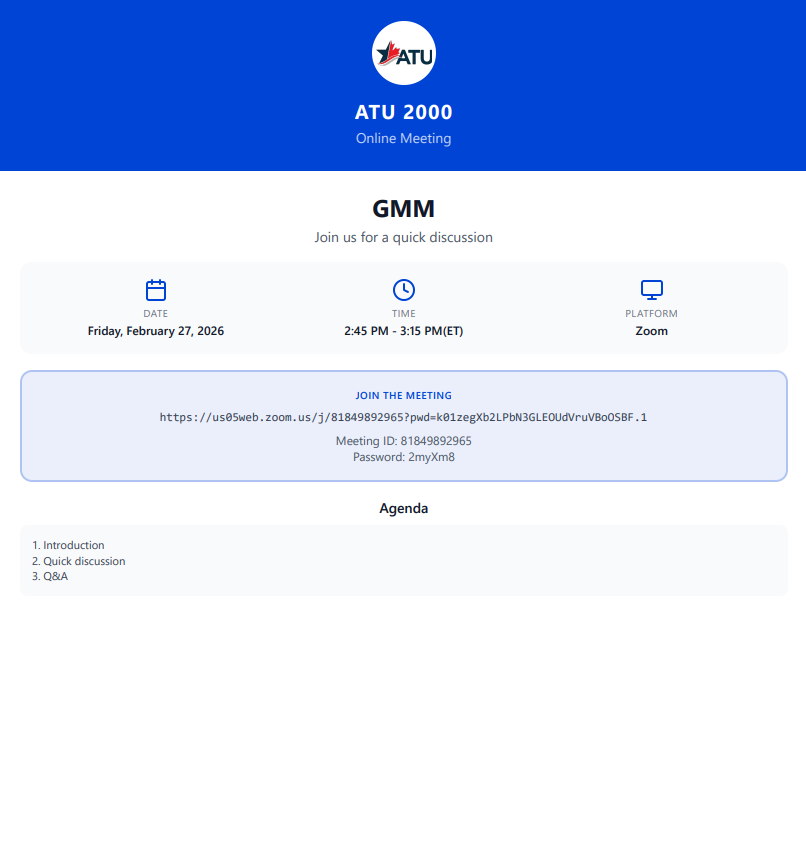
On any meeting card, open the action menu and click Download Poster. A poster dialog opens with a fully designed poster featuring:
- Coloured header banner with your union's logo and name
- Meeting title and description prominently displayed
- Info grid showing the date, time (with timezone), and platform
- "Join the Meeting" section with the meeting URL, Meeting ID, and password
- Agenda section (if you provided an agenda when creating the meeting)
- Union footer for a polished, professional finish
At the bottom of the dialog, you'll find two action buttons:
- Print / Save as PDF — opens your browser's print dialog, where you can print the poster directly or save it as a PDF file
- Copy Meeting Link — copies the meeting URL to your clipboard for quick sharing
Print the poster for bulletin boards in the workplace, save it as a PDF to attach to emails, or share the image on social media and messaging groups. The poster uses your union's theme colour and logo, so it looks professional and on-brand every time.
Step 4: Send Meeting Invitations
Once your meeting is scheduled, you'll want to make sure members know about it. UnionTab lets you send email invitations directly from the meeting card.
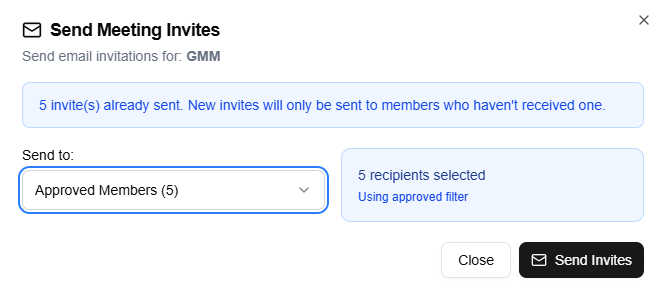
Open the action menu on any meeting card and click Send Invites. The Send Invites dialog lets you select recipients using the "Send to:" dropdown:
- All Members
- Approved Members (default)
- Admins Only
- Pending Members
- Rejected Members
- Custom Selection — shows a searchable member table with checkboxes so you can pick specific people
The dialog also shows how many invites have already been sent for this meeting. When you click Send Invites, new invitations are only dispatched to members who haven't received one yet — so you never have to worry about sending duplicate emails.
Each invitation email includes the meeting details and a direct join link, making it easy for members to join when the time comes.
Meeting Card Actions
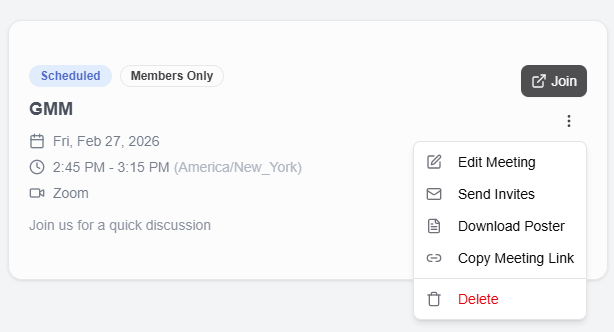
For admins, each meeting card includes a dropdown menu with the full set of management actions:
- Edit Meeting — update the title, description, time, link, or any other details
- Send Invites — email meeting invitations to selected members
- Download Poster — generate and download the branded meeting poster
- Copy Meeting Link — copy the join URL to your clipboard
- Delete — permanently remove the meeting
Regular members see a simplified view with the meeting details and a join button — clean and straightforward.
Pro Tips for Better Meetings
- Schedule meetings in advance — give members at least a week's notice for better attendance. Last-minute meetings tend to have low turnout, especially for members working shifts.
- Use the poster — print it for bulletin boards in the workplace, share it in group chats, or post it on social media. A visual reminder is far more effective than a text-only notification.
- Set up Zoom API integration — if your local uses Zoom regularly, connect the Zoom API in your union settings. The auto-create feature generates meeting links, IDs, and passwords automatically without you ever leaving UnionTab.
- Copy the meeting link — share it via text message, WhatsApp, Facebook groups, or any other channel your members use. The more places you share it, the better your attendance.
- Use Send Invites strategically — send an initial invitation when the meeting is created, then send again a day or two before the meeting to catch anyone who missed the first one. UnionTab only sends to members who haven't received an invite yet, so there's no risk of spamming.
Meetings vs. Events: A Quick Recap
To avoid confusion, here's the key distinction:
- Meetings (covered in this tutorial) are for online video conferences — they include a platform, join link, meeting ID, and password. Use these for virtual general membership meetings, steward check-ins, committee calls, and bargaining updates.
- Events are for general calendar items — in-person gatherings, social events, training sessions, rallies, and anything that doesn't require a video link.
Both features are available under the Tools mega-menu, so you can manage your local's entire schedule from one place.